Replace an analogue amplifier
The existing force sensors and roller may remain useful, but the potentiometer-adjusted electronics are difficult to set up, document or support.
Likely path: compatibility audit → EMGZ309 family
Replace an obsolete tension amplifier, add tension measurement to a roller or send measurements to a machine controller (PLC). Start with the existing roller and the result you need, then choose the load cells, electronics and any automatic control together.
 Gauge Advisor is an authorized FMS sales & applications support partner. We help processors document the machine, narrow the equipment path, coordinate final FMS review, and move the project through quotation and implementation planning.
A “bad tension reading” is not automatically a failed load cell. The problem may be mechanical loading, wiring, signal electronics, calibration, PLC scaling, the actuator, or the process itself. Define the desired outcome before changing parts.
The existing force sensors and roller may remain useful, but the potentiometer-adjusted electronics are difficult to set up, document or support.
Likely path: compatibility audit → EMGZ309 familyThe machine has no direct force measurement, or the current signal is inferred from brake pressure, dancer position or drive current.
Likely path: roller geometry → sensor family → electronicsThe plant needs a stable analog value, left/right data, recipes, configuration access, or EtherNet/IP, PROFINET or EtherCAT integration.
Likely path: I/O narrative → model-specific interfaceThe project must regulate an unwind brake, unwind or rewind drive, or intermediate section—not simply show a number.
Likely path: force sensors → CMGZ controller → actuator reviewA junior engineer should be able to trace the system from the material to the machine action. If one layer is missing or misunderstood, changing the amplifier may not solve the production problem.
The web changes direction around the measuring roller. That geometry creates a resultant force at the roller supports. For a simple symmetrical deflection, a preliminary reference is 2 × tension × sin(wrap angle ÷ 2), before accounting for roller weight, force direction, acceleration and the number of sensors. Final sizing uses the actual machine geometry.
A measuring amplifier converts the load-cell signal into a value a display or PLC can use. Automatic correction also needs a controller and a suitable brake or drive. Define which equipment the controller may adjust, the interlocks and limits, the tuning, and how the machine responds if control is lost.
FMS offers force-measuring bearings, blocks and complete measuring rollers for different machine constructions. A visually similar sensor is not automatically a mechanical or electrical replacement.
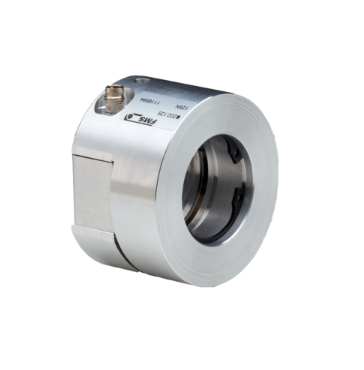
A compact aluminum force sensor for continuous-material lines using a rotating live-shaft idler. FMS publishes a 30:1 measuring range, ±0.5% accuracy class, nominal forces from 50 to 1,000 N and overload protection up to ten times nominal force.

Compact stainless-steel force sensors for dead-shaft idlers. FMS publishes nominal force ratings from 50 to 1,500 N, a 30:1 measuring range, ±0.5% accuracy class, multiple metric and imperial adapter diameters, and high-temperature or vacuum options.

A complete cantilever force sensor and measuring roller for compact one-sided installations. FMS publishes nominal forces from 50 to 1,000 N, a 30:1 measuring range, ±0.5% accuracy class and overload protection up to ten times nominal force.
| Roller or machine architecture | Preliminary FMS family direction | What still controls the selection |
|---|---|---|
| Live-shaft idler | A, F, LMGZ or LMGZD force-measuring bearings | Shaft size, bearing arrangement, force direction, roller weight, operating range and precision need |
| Dead-shaft idler | CA or FA force sensors | Journal and adapter geometry, stationary shaft, shell bearings, space, nominal force and environment |
| External pillow blocks | UMGZ; UMGZP for defined PR 9951 replacement; application-specific sealed families | Bolt pattern, bearing size, horizontal/vertical loading, environment, temperature and replacement identity |
| Cantilever station | RMGZ9 or compact RMGZ9M direction | One-sided mounting, face length, diameter, coating, orientation, speed and access |
| Complete measuring roller | IMGZ direction | Roll length, diameter, shaft interface, web position, nominal force, balance and line speed |
| Individual wire or strand pulley | RMGZ100/200/300/400/800 and telemetry paths | Stationary versus rotating machine, pulley, strand count, speed, centrifugal effects and data transmission; use the wire & cable tension path |
Common naming: processors often search for “web tension load cells.” FMS generally uses “force sensor,” “force-measuring bearing,” “force-measuring block,” or “measuring roller.” The correct term follows the machine construction—not the phrase on the purchase request.
Do not assume that a modern display, a current output and an industrial-network interface are interchangeable. Identify sensor feedback, channel count, housing, power, analog scaling, PLC protocol and whether the system only measures or also controls.

FMS positions the single-channel EMGZ309 as a plug-and-play replacement for analogue potentiometer-adjusted units and for use with FMS force sensors. It supports setup from the three-key display or a web browser.
“Plug and play” still needs a check: confirm the existing sensor, terminals, feedback signal, power, output scaling, housing, cable, calibration and any machine logic before replacement.
Official EMGZ309 details ↗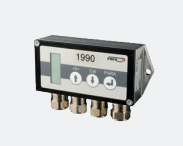
A compact digital strain-gauge amplifier with three-key/LCD setup and optional operation through the free FMS-ComACT app. The app can display sensor feedback, log and export short data records, and save configuration settings.
Useful for commissioning: configuration records and short signal logs can improve evidence. They do not replace a machine historian, safety system or full production-data platform.
Official EMGZ310.ComACT details ↗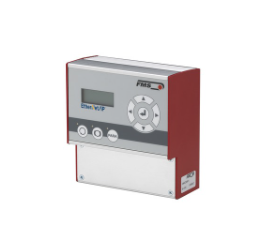
When the project must regulate an unwind brake, unwind or rewind drive, or intermediate driven section, a tension controller compares measured tension with the target and commands a compatible actuator. CMGZ309 and CMGZ309.EIP both provide analog output paths; CMGZ309.EIP also adds an EtherNet/IP fieldbus for machine-network integration.
Start a controller review: send the control zone, the installed brake or drive model, and the change you need. Include the PLC and preferred interface if known. We will use these details to narrow the controller path and identify the compatibility checks needed before quotation.
Official CMGZ309.EIP details ↗EMGZ321 measures the two sides of a roller independently so the machine can see left/right load distribution rather than only one combined value. FMS also publishes single- and dual-channel amplifier families for EtherNet/IP, PROFINET IO and EtherCAT. Select the protocol, channel count and input variant deliberately; do not treat a web-browser setup port as a plant fieldbus.
Confirm the machine connection: document the PLC and communication protocol, including which controller manages the connection (the scanner or master). Also define the update rate, data, parameters, alarms, units, scaling, byte order, network security and the response to lost communication before quotation.
A practical retrofit may keep the roller and force sensors, replace only the electronics, replace the complete measuring station, or add automatic control. The least expensive hardware change is not automatically the lowest-risk project.
Do not bypass safeguards to gather data. Electrical testing, mechanical loading, calibration and machine operation must follow plant procedures and be performed by appropriately qualified personnel.
Capture manufacturer, model, serial, sensor count, mounting, wiring, power, outputs, PLC scaling, drawings, parameter settings and known modifications.
State whether the plant needs restored monitoring, better repeatability, left/right visibility, network data, records, alarms or automatic control.
Use entry and exit angles, wrap, minimum and maximum web tension, roller weight, force direction, dynamics and number of sensors.
Confirm mechanical fit, sensor health, amplifier input, outputs, housing, network, controller and actuator instead of assuming a part-number substitution.
Assign mechanical, electrical, PLC, network, safety, calibration, startup, tuning, training, documentation and performance-test responsibilities.
Mounting dimensions, shaft and bearing construction, roll face, force direction, nominal load, overloads, alignment, balance, speed, environment and service access must match.
Sensor feedback range, bridge and excitation, connector, cable, shielding, amplifier input, power, analog range, polarity, scaling and grounding must be reviewed.
Define the PLC protocol, update rate, responsibility for the program and the brake or drive commands. Confirm the adjustment range the brake or drive can provide, together with interlocks, manual operation, limits and the safe response to lost communication.
In an FMS-published project at Visy Industries in Australia, CGB Precision Products replaced obsolete Philips PR9951 force-measuring blocks with FMS UMGZP sensors. A dual-channel amplifier allowed operators to monitor tension on each side of the web separately. The team checked mechanical fit and resonance before installation and calibration.
Planning a similar retrofit? Send the existing model, roller photos and what you need the system to do.
The material name does not select the sensor by itself. Machine mechanics, running force, environment, signal use and control objective still govern the system.
Measure through haul-off, treatment, coating, slitting and winding zones; relate tension to wrinkles, stretching, tracking and roll formation.
Keep force data separate from coating weight while using it to understand registration, dryer transport, lamination, slitting and winding behavior.
Add direct tension feedback around unwind, registration, print, die-cut, lamination and rewind sections.
Choose sensor constructions for roller weight, wide operating ranges, moisture, temperature and demanding production environments.
Review high forces, heavy rollers, harsh environments, pillow-block arrangements and plant-specific controls standards.
Stationary pulley measurement and rotating strand-tension systems use different equipment paths. See the dedicated wire and cable architecture for telemetry and brake control.
Choose the machine goal, roller support, approximate force range, data connection and whether the line needs monitoring, automatic tension control, cross-web analysis or guiding.
Retrofit boundary: selector results are preliminary. Final replacement compatibility still requires the installed model, mounting, wiring, sensor feedback, actual load, output, PLC and machine-control review.
Start with the existing sensor or amplifier model, a roller photo and your goal. The checklist below helps with equipment selection and quotation; you can begin the inquiry before you have every detail.
Tension is one layer of the production system. Thickness, coat weight, web position, cross-web tension profile and wire/cable telemetry answer different questions.
Gauge Advisor helps review the application, gather drawings and operating details, compare sensors and electronics, and coordinate FMS’s technical review, quotation and installation planning. For an existing equipment fault, collect the model, serial, wiring, symptoms, alarms, photos and production impact so the request can be routed to the appropriate FMS resource. FMS owns manufacturer product-service, repair, maintenance and factory technical determinations.
The project agreement must assign responsibility for electrical work, mechanical repair, machine safety, lockout/tagout, PLC changes, site work, commissioning and acceptance. These activities must be performed by qualified personnel contracted for that work.
These answers establish a preliminary direction. Final mechanical fit, force range, electrical compatibility, control authority, performance and project responsibility require the actual machine details and written scope.